Directing and media
Advance one approved Moment through visual references, WHAT and WHY, filmable HOW, shots, diagnostics, camera planning, production, and revision-aware results.
The directing production path
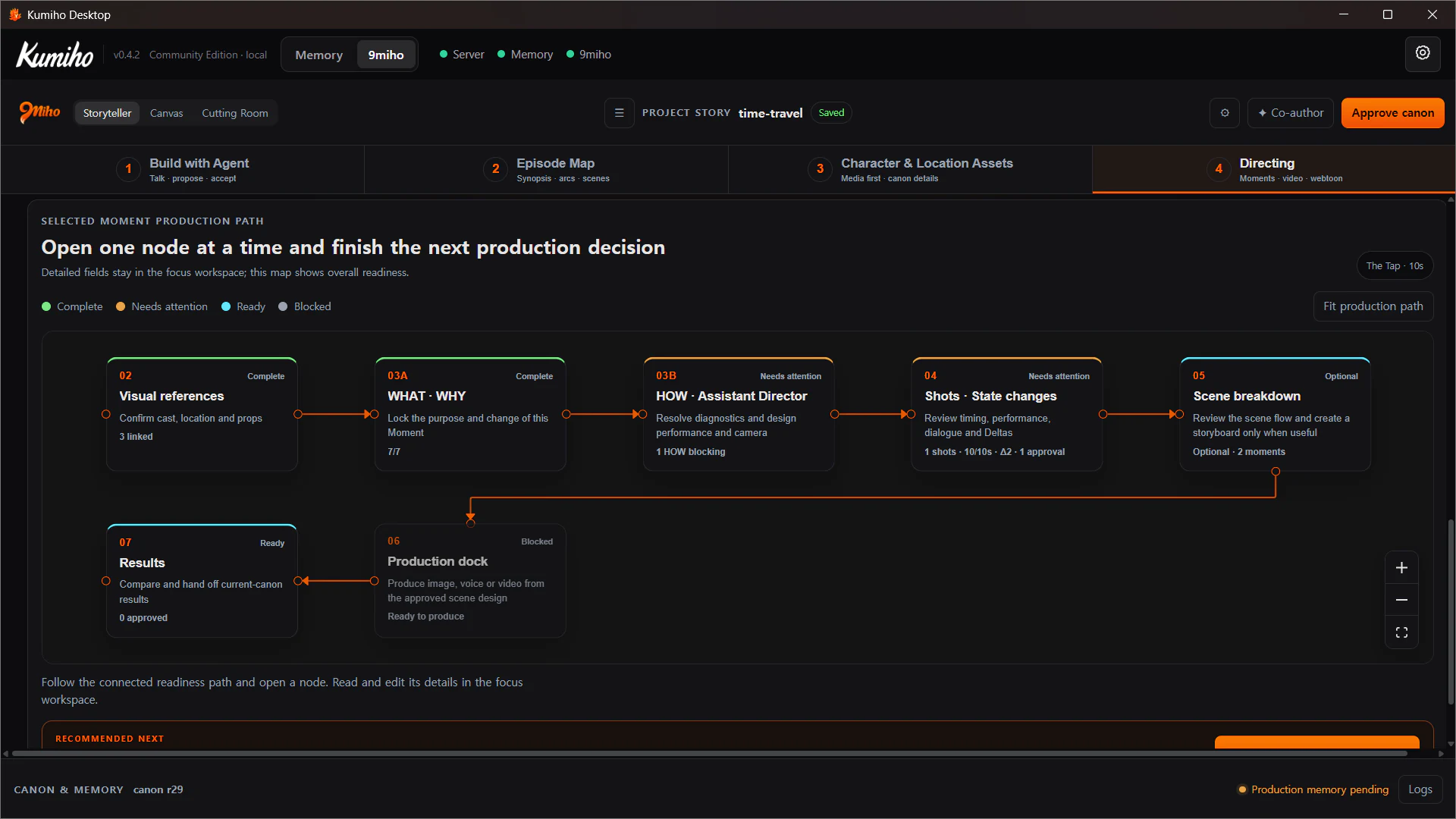
Select a Moment in Episode Flow to open its production path. The map presents the first incomplete requirement as the primary action instead of encouraging a paid generation before the story and references are ready.
The exact stage sequence is:
- Visual References
- WHAT · WHY
- HOW / Assistant Director
- Shots / State Changes
- Scene Breakdown
- Production Dock
- Results
Each stage reports Complete, Needs attention, Ready, or Blocked. This is a purpose-built status graph; cards are not generic Canvas nodes and cannot be rewired.
Approve identity before directing motion
The Asset stage holds dossiers for Characters, Locations, and Props. Each dossier can include story purpose, core impression, visible anchors, continuity invariants, and generation references.
You can link an existing pinned Library Revision or generate a missing reference. Linking stores the exact provenance used by Storyteller; it does not move the Library Item’s global approval pointer or launch another generation.
Specialist prompt turns prepare editable execution copy without inventing new Canon:
- Casting Director converts approved role, relationships, social position, visual anchors, and continuity into portrait, full-body, or character-sheet prompts.
- Art Director converts the location’s story use, geography, zones, entrances, materials, set dressing, practical light, and depth into a coherent environment prompt.
- Prop work keeps physical identity and material separate from the temporary way the object is presented in one Shot.
These prompt turns are separated from the long Storyteller conversation and from generation spend. The creator reads and edits the prompt before pressing Generate.
Protect WHAT and WHY, design HOW
The Assistant Director receives the selected Moment, the previous and next Moment needed for continuity, accepted character state, approved references, and creator instruction.
It may propose:
- performer objectives, obstacles, tactics, observable actions, and landing states;
- blocking, movement, distance, eyelines, and use of props;
- the scene camera design and Shot-specific framing and movement;
- light, ambience, sound effects, exact dialogue, and silence;
- ordered Shot duration and the resulting State Deltas.
It may not change the accepted event or reason, introduce a new relationship, give a performer future knowledge, or manufacture story facts merely to produce a more convenient video prompt.
Shots, dialogue, and silence
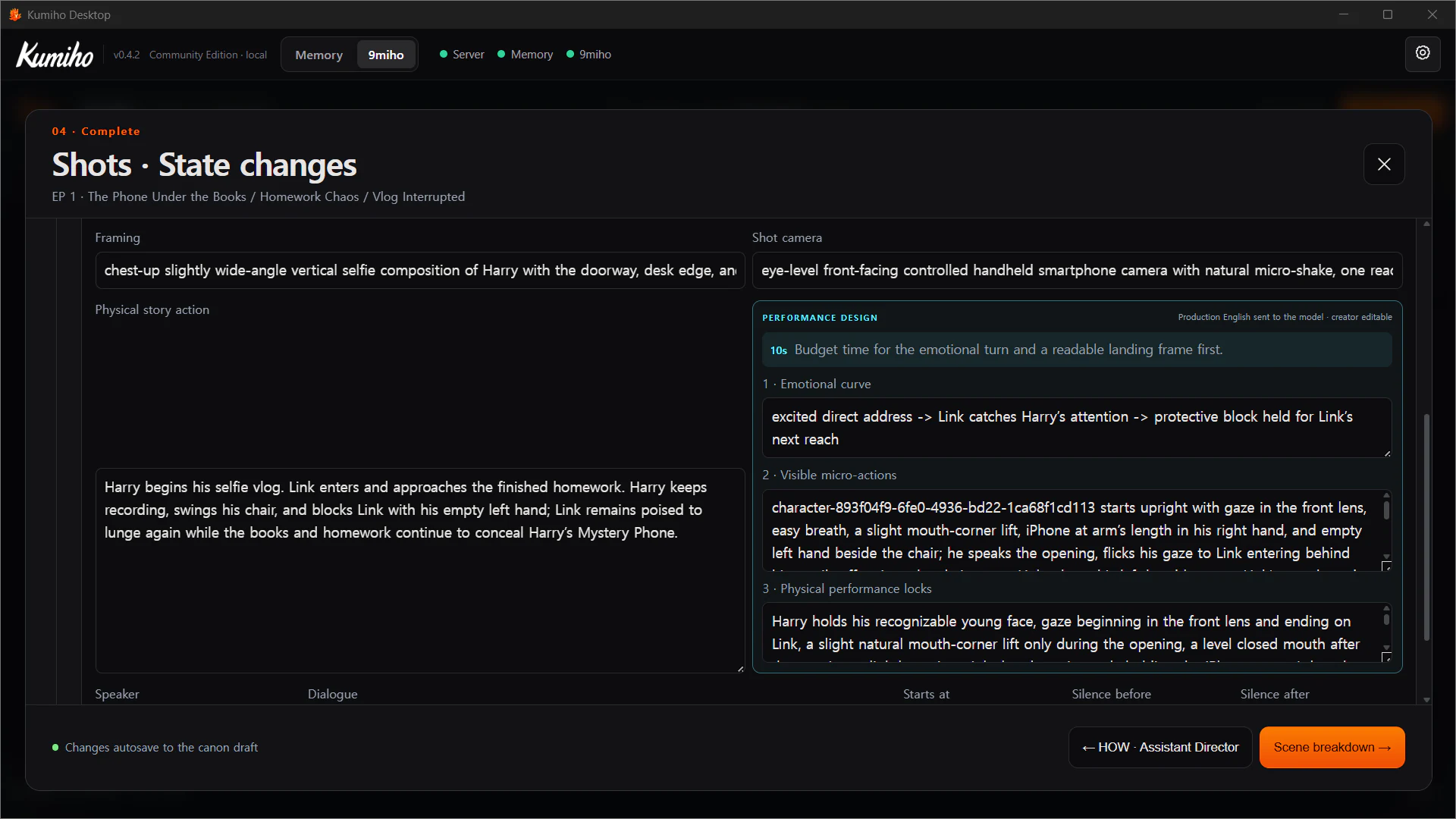
04A Video Shots and 04B State Changes keep visual execution separate from story consequence.
Every Shot can define framing, camera, physical story action, performers, visible micro-actions, and duration. Shot durations must add up to the Moment duration. Very short shots need a readable action budget rather than several competing gestures.
Dialogue is exact authored text attached to a speaker and timing. It is not paraphrased from ambience. If no dialogue or heard voice is authored, the performance is silent. For a native-audio model that cannot disable spontaneous speech at request time, 9Miho can enforce the silent Direction by stripping generated audio before registration when the approved Direction contains no voice.
Production diagnostics
Before a paid generation, Storyteller checks four groups of evidence:
| Group | Examples |
|---|---|
| Canon and time | episode/scene membership, participant and location validity, future knowledge, ended relationship terms |
| Performance and continuity | performer ownership, blocking, adjacent State Delta handoff, impossible spatial pairings |
| Camera and dialogue | missing framing, Shot order and total length, speaker and line timing, speech-like non-dialogue cues |
| References and lineage | pinned Revision, current Project scope, expression metadata, conflicting prop container imagery |
Errors lock generation. Warnings keep it available but identify the director decision that still needs attention. Ask Assistant Director can revise only the selected stable Moment while preserving Episode order and approved WHAT/WHY.
Scene Breakdown and Production Dock
Scene Breakdown / Storyboard is an optional scene-wide continuity review. It can verify cast, location, props, and Moment order before one production output is generated. You can mark the breakdown reviewed or explicitly skip the storyboard for that scene.
The Production Dock exposes one paid, reviewable output at a time:
- Moment image;
- character dialogue voice;
- blocking/camera-path diagram;
- 3D camera previz;
- Moment video;
- Webtoon panel where that output mode is used.
The Output Shelf keeps purpose, medium, exact source, Canon Revision, approval time, and freshness. Fresh · current canon means the output still matches its production contract. Stale · earlier canon remains visible and pinned; it is not silently overwritten or regenerated.
Approved video outputs expose a Cutting Room action that hands the exact Item Revision into the Bin.
3D camera blocking and previz
3D CAMERA PREVIZ converts an authored Direction into editable spatial evidence before an expensive video run.
Start with Direction → path draft. A Cinematographer proposal uses the selected Moment, approved location and cast references, and neighboring spatial continuity. Apply or discard the proposal, then edit camera and actor keys, lenses, vertical field of view, transforms, pose presets, easing, and curves in Shot view or Bird view.
Approval saves a Camera Plan and MP4 together. A fresh pinned previz can become a video performance reference only when the selected model Variant exposes a compatible video-reference port.
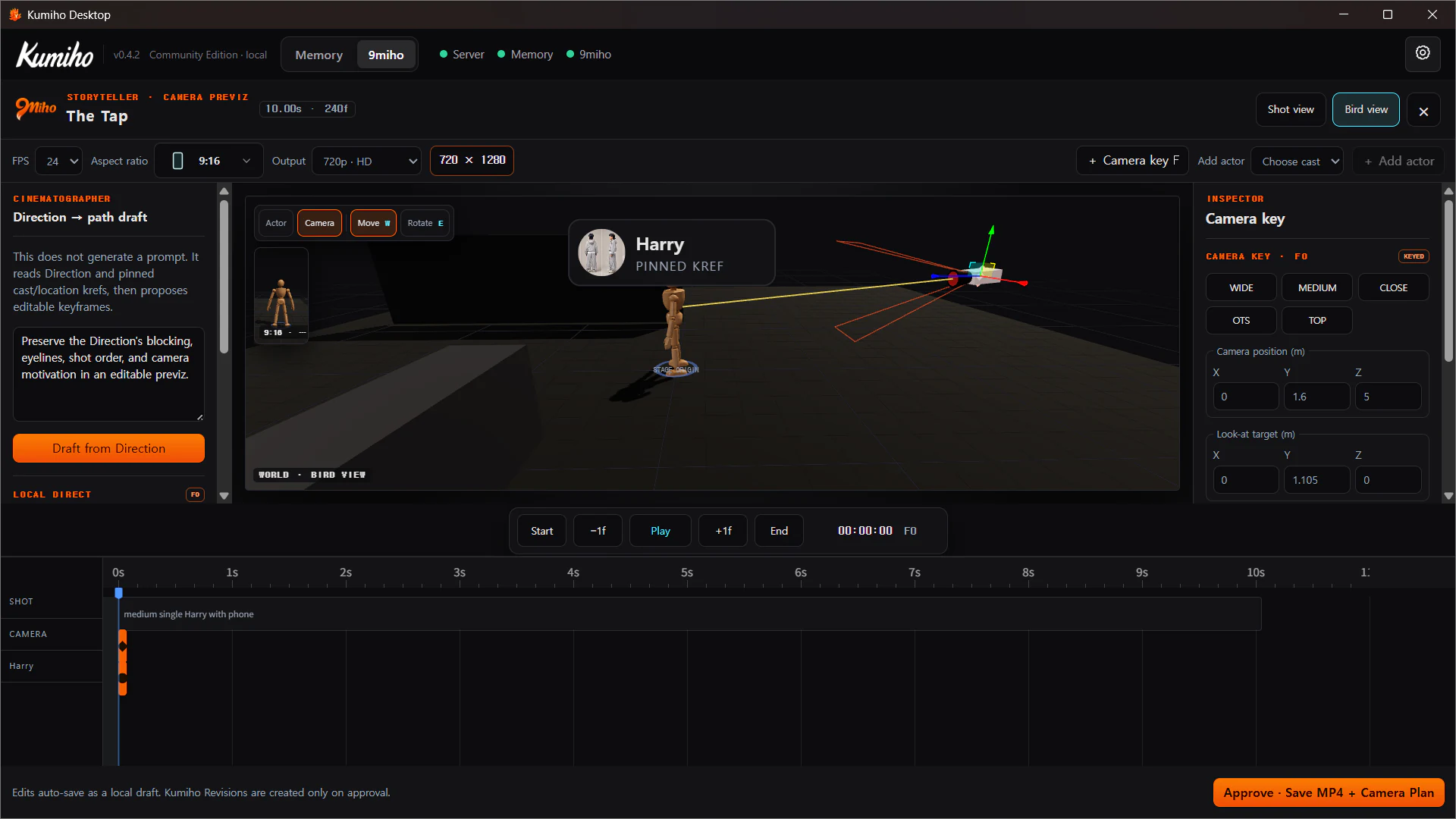
Current previz boundaries are explicit: export requires browser WebCodecs support and compatible AVC encoding, approval is capped at 90 seconds, dummy puppets represent spatial blocking rather than final likeness, and a changed Canon, Direction, or reference set makes an old previz stale.
Webtoon output from the same Canon
The optional Panel Studio uses the same approved Moments and identities for a vertical reader output. Panel Direction separates visible story beat, framing, composition, pose/gaze, continuity, balloons, exact authored text, and lettering mode.
Editable overlay preserves exact searchable text outside the generated image. Bake into image asks the image model to render lettering and can introduce visual text errors. A panel target is a pacing budget, not a command to launch that many generations.
The implemented handoff is a vertical-reader HTML export plus manifest. It is not automatic episode batch rendering or a full multi-page comics layout application.
See Webtoon production for the complete panel contract, bounded planning flow, lettering policies, QC states, and release rules.