Webtoon production from Living Canon
Plan vertical panels from approved Moments, direct and generate one bounded panel at a time, and release only outputs that still match current Canon and Webtoon QC.
One story system, another production format
Webtoon is a production format inside Storyteller, not a separate top-level application. The same approved Canon, character state, relationships, locations, props, visual references, and causal Moments used for video can be expressed as a vertical panel sequence.
That distinction matters. A panel is not an isolated prompt and an Episode is not a folder of unrelated images. Each panel belongs to one exact Moment and carries a reviewable production contract for the part of the story it must show.
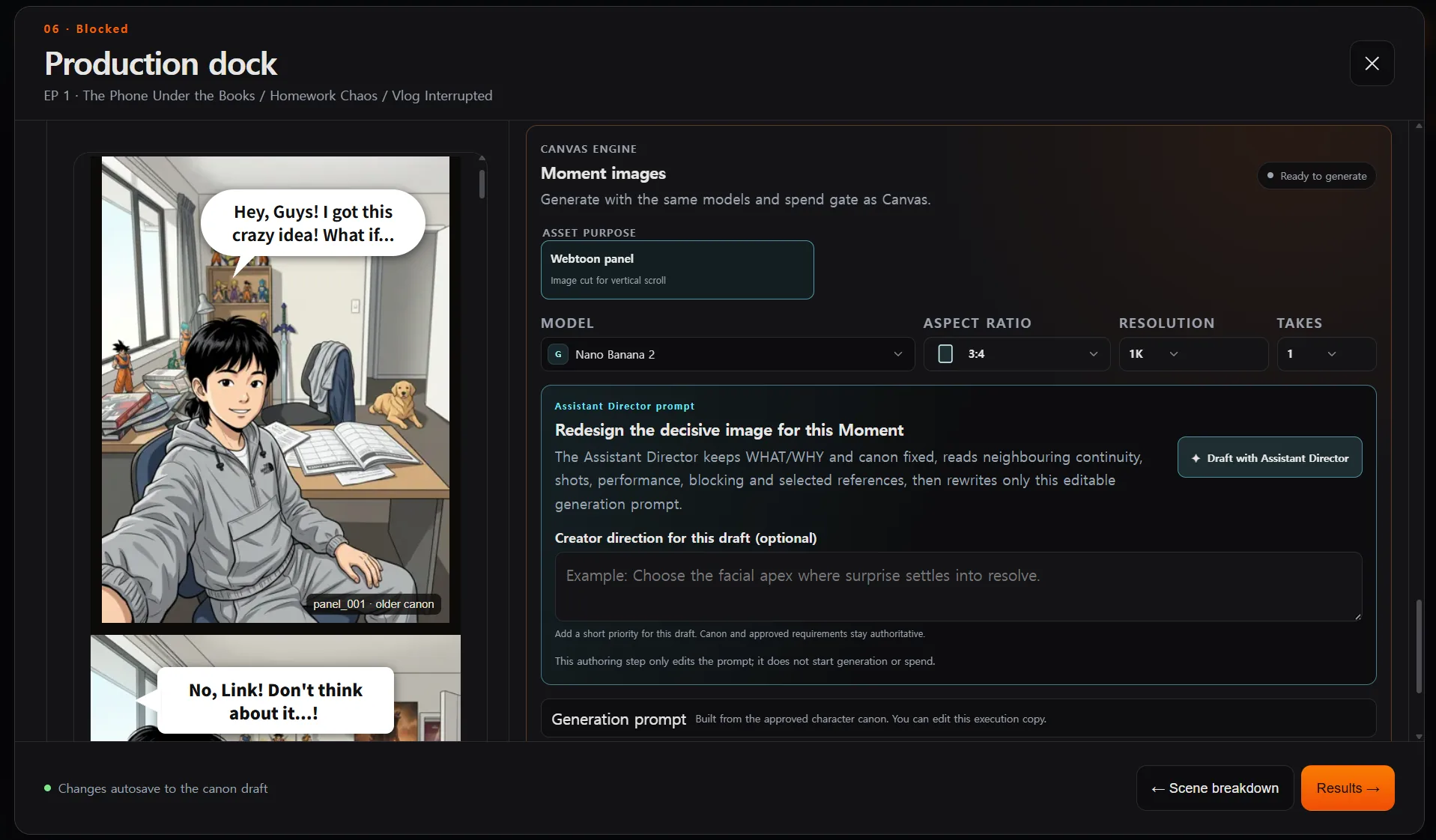
What a panel Direction contains
A Webtoon panel separates story meaning from visual execution. Its authored fields include:
- the visible story beat and the Moment it belongs to;
- framing, composition, camera, pose, gaze, and transition;
- participating character and prop references;
- continuity constraints and the intended panel size;
- ordered dialogue, thought, caption, shout, and SFX records;
- the lettering mode used for final presentation.
This makes the panel inspectable before generation. An Assistant Director may improve the editable execution copy, but it cannot quietly replace the Moment’s approved WHAT or WHY, switch its cast, or invent a new story event.
From an Episode to bounded panel production
The planning and paid-generation boundaries are deliberately separate:
- Choose the Webtoon format and approve the story foundation. Episode, Moment, character, location, and prop identities come from reviewed Storyteller records.
- Plan the panel rhythm. The default target is 50 panels per Episode and can be set from 1 to 200. It is a pacing budget, not a quality threshold or render count. Planning starts from one complete foundation panel per Moment, then extends a Moment by no more than five suffix panels in one proposal batch while preserving already-authored complete panels.
- Review the proposal. The Draft is not changed until the complete planning proposal is returned and the creator accepts it. Planning does not launch image generations.
- Open one selected panel in the Production dock. Choose an available image model, authored aspect ratio, supported resolution, and explicit number of Takes.
- Confirm generation through the normal execution boundary. Storyteller materializes the selected catalog Variant through the shared Canvas execution system, then pauses at the same itemized spend confirmation used elsewhere in 9Miho.
- Compare and approve the result. The selected Take is recorded with the exact panel, Canon, Direction, references, model configuration, and lineage that produced it.
The Episode can be planned as a sequence without turning the panel target into an invisible credit-consuming render batch. Different Moment lanes may be planned concurrently, but one Moment remains ordered; stopping or failing the operation does not partially apply completed batches to the Draft.
Exact lettering or lettering inside the image
Storyteller offers two lettering policies:
| Mode | What is generated | Trade-off |
|---|---|---|
| Editable overlay | Clean art without captions, balloons, labels, or embedded written language; exact structured text is composited later. | Preserves searchable, editable, exact text and avoids asking an image model to spell. |
| Bake into image | Art and the locked lettering contract are sent to the image model together. | Useful when lettering must be part of the pixels, but visual text errors remain possible. |
The complete Moment script is a closed, ordered ledger. Panel balloons consume an exact contiguous prefix, so an agent cannot translate, shorten, paraphrase, or reorder authored dialogue while extending the visual sequence. In overlay mode, sibling-panel dialogue and unrelated text do not enter the selected panel’s image render. The panel gets only the lettering and story inputs that belong to it.
Canon, QC, and release states
Authoring preview and release truth are not the same thing. A newly approved Take can appear while it is still waiting to be registered into approved Canon. Webtoon production therefore distinguishes:
- Pending Canon — the Take exists but is not yet part of the approved story record;
- Pending QC — the current output still needs Webtoon-specific visual review;
- Approved — the server confirms the current source contract, approved output head, and QC state;
- Stale — a source Canon, panel contract, reference, or approved head has changed;
- Missing — there is no current releasable output for that panel.
Release and export use the server’s exact source-contract check. A browser-side “fresh” label by itself is never enough to publish a panel. Changing a later sibling panel also does not unnecessarily invalidate an already approved panel whose own inputs are unchanged.
Reader handoff
An approved Episode can be exported as standalone vertical-reader HTML with its approved panel art embedded. A separate JSON manifest can also be downloaded. Reading order follows Episode scene order, Moment order, and local panel order, while structured overlay lettering remains positioned over its intended panel. The HTML’s embedded source total is capped at 64 MiB, and the HTML is registered as a versioned Kumiho sequence Asset before download.
Current boundaries are explicit:
- 9Miho does not silently render an entire Episode after planning it;
- a panel target is not a paid generation count;
- incomplete, stale, pending-Canon, or failed-QC panels do not pass release;
- the reader export is a production handoff, not a full multi-page comics layout and publishing suite.
Canvas remains available when you want to reuse approved panels in a custom graph, automate a deliberate repeat task, or combine them with other image, video, audio, and finishing workflows.