Assets, Runs, and automation
Pin or follow Asset Revisions deliberately, validate and resume Runs, compare approved Takes, inspect lineage, and reuse graphs for bounded repeat work.
Library and History answer different questions
Canvas has two production browsers:
- Library is the durable Asset and Revision browser. Use it to find an identity, choose a Revision, preview media, insert an Asset node, copy a Kref, or inspect lineage.
- History is generation- and Run-oriented. Use it to find outputs by date or Space, inspect where they came from, and locate the producing Run.
An output appears in production history because a Run created it; it remains reusable because it was registered as an Asset with stable identity and Revision.
Latest versus pinned input
An Asset node can follow latest or bind to one exact Revision.
Use latest when the Flow is intentionally a living template that should pick up the newest source at the next Run. Use a pinned rN when you need identity continuity, an exact comparison, or reproducible evidence.
Materialization resolves latest once at Run start. The resulting Run and Take record the resolved source rather than leaving the historical execution attached to a moving pointer.
Validate before spend
Validate compiles the current Flow against its real catalog contracts. It catches graph and capability problems before a paid dispatch.
The spend confirmation shows priced lines where the catalog has a usable estimate. A line marked unpriced remains explicitly unknown; it is not displayed as zero or described as free.
The embedded Agent can propose a Run after helping build the Flow, but the human-facing confirmation remains the authorization boundary.
Run, Run to here, Resume, and Reconnect
- Run materializes the full graph.
- Run to here runs one selected target and its exact ancestor closure.
- Resume or Reconnect attaches to durable work after an interruption.
Completed steps are not automatically rerun or recharged during recovery. Node-level status and errors identify the precise step that needs attention.
One paid execution should stay understandable. Canvas does not present an implicit unlimited batch scheduler. Ordered List consumers run sequentially, Direction sequences are capped at eight, and multi-Take output is available only on Variants that explicitly opt in.
Takes, approval, and rerun
Supported image and video capabilities can create 1–4 Takes. Each Take is a distinct output Asset with provenance.
Approval means: select and reuse this exact completed output. It does not regenerate the media. A multi-Take result is approved as the complete output set when the node contract requires all-or-nothing approval.
Use Force rerun only when you intentionally want new generation and a new cost boundary. This distinction prevents a normal reuse action from quietly spending again.
Lineage makes reuse accountable
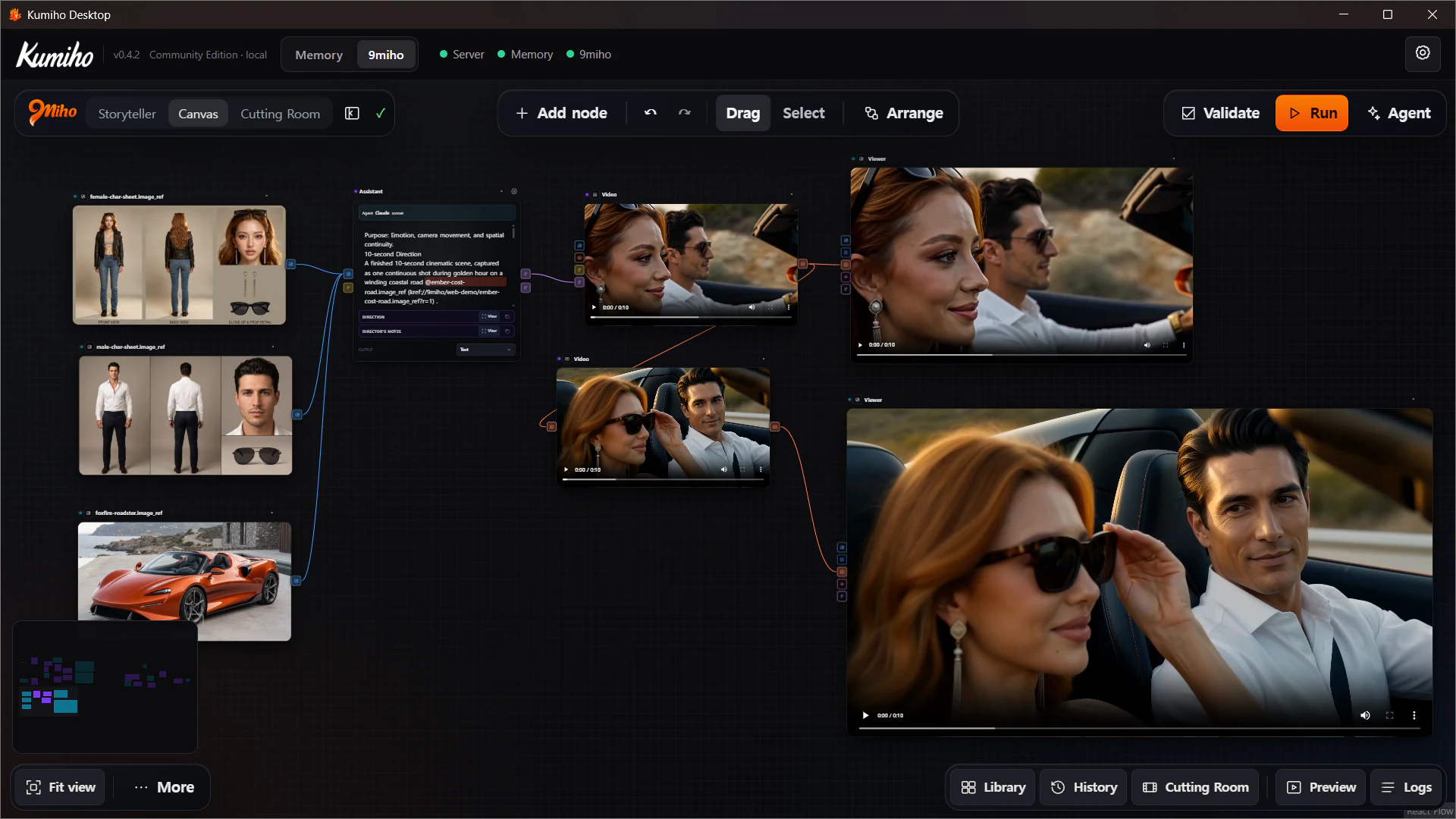
Lineage connects an output to its exact source chain. Depending on the Flow, it can include source Asset Revisions, Direction, rendered prompt, catalog Variant, Run step, and output Revision.
Use lineage when you need to answer:
- Which character sheet Revision produced this clip?
- Did this Take use the original Direction or a revised one?
- Which model Variant and Run created the approved output?
- What downstream work depends on this Revision?
A node preview shows the media. Lineage explains why that media exists and what would change if one source moved.
Named Templates
Save Template stores the entire current Canvas as a named browser-local template. Loading it replaces the current Canvas as one undoable operation.
Templates are useful for personal repeat tasks and proven graph shapes. They are not currently team-shared or cloud-versioned template records, and loading one does not merge it into the existing Flow.
If a repeat process needs durable Project history, save a normal Flow and use pinned Asset Revisions rather than treating a local Template as the production record.
Ordered List work
List nodes support bounded repeat work without requiring a separate graph for every input. Reorder, include, or exclude rows, then connect the collection to a compatible consumer.
The actual behavior is declared by the consumer: broadcast a singleton, zip compatible lists, process each item sequentially, or send a collection together where the model supports it.
This is useful for controlled comparisons and small production sets. It is not a promise of arbitrary nested loops, visual child graphs, unattended credit fan-out, or automatic retry-until-good behavior.
Move approved material forward
Approved outputs can be inserted back into Canvas as Asset nodes, used in another Flow, opened from Library/History, or handed to Cutting Room.
Cutting Room receives the exact video or audio Item Revision. Changing the Bin’s selected Revision later does not rewrite clips already placed on a cut. The production decision stays pinned at each boundary.