Timeline, colour, and handoff
Configure a conformable project, assemble picture and sound, inspect source and colour evidence, then choose between a flattened Movie Export and a revision-aware OTIO handoff.
Project rate and raster
Project settings defines the Timeline contract before export.
Frame-rate presets include 23.976, 24, 25, 29.97, 30, 50, 59.94, and 60 fps. Raster presets include 16:9, 9:16, 1:1, 4:5, and 4:3, with a custom raster option.
The current conform scales picture with Contain only. The scaling field is intentionally read-only; Crop/Fill and per-Clip spatial transforms are not currently exposed.
Variable-frame-rate media is refused rather than conformed by guesswork. Prepare a constant-frame-rate source before adding it to a production cut.
Picture and sound on the Timeline
Create and remove compatible tracks, move Clips across tracks, and use mute/solo for monitoring. The topmost active video track supplies picture at a given time.
Audio tracks sum. A measured embedded audio stream from a video Clip can also contribute. Audio-track level, mute, solo, global mute, and global volume affect monitoring.
These monitor controls are included when making a flattened Movie Export. They are not written as mix automation into Save or OTIO. The current editor does not expose fades, pan, effects, envelopes, waveform display, or loudness metering.
Colour and source inspection
The selected Clip provides a set of inspection and colour controls:
- input-colour declaration and measured H.273 facts;
- view transform;
.cubeLook shelf and Look amount;- exposure and gamma;
- individual channel isolation;
- per-placement ASC CDL wheels and numeric values;
- RGB + Luma waveform and Parade scopes.
Input colour is a declaration about the source Take. ASC CDL is an edit decision on this particular Timeline placement. Two Clips can point to the same source Revision and carry different per-placement CDL decisions.
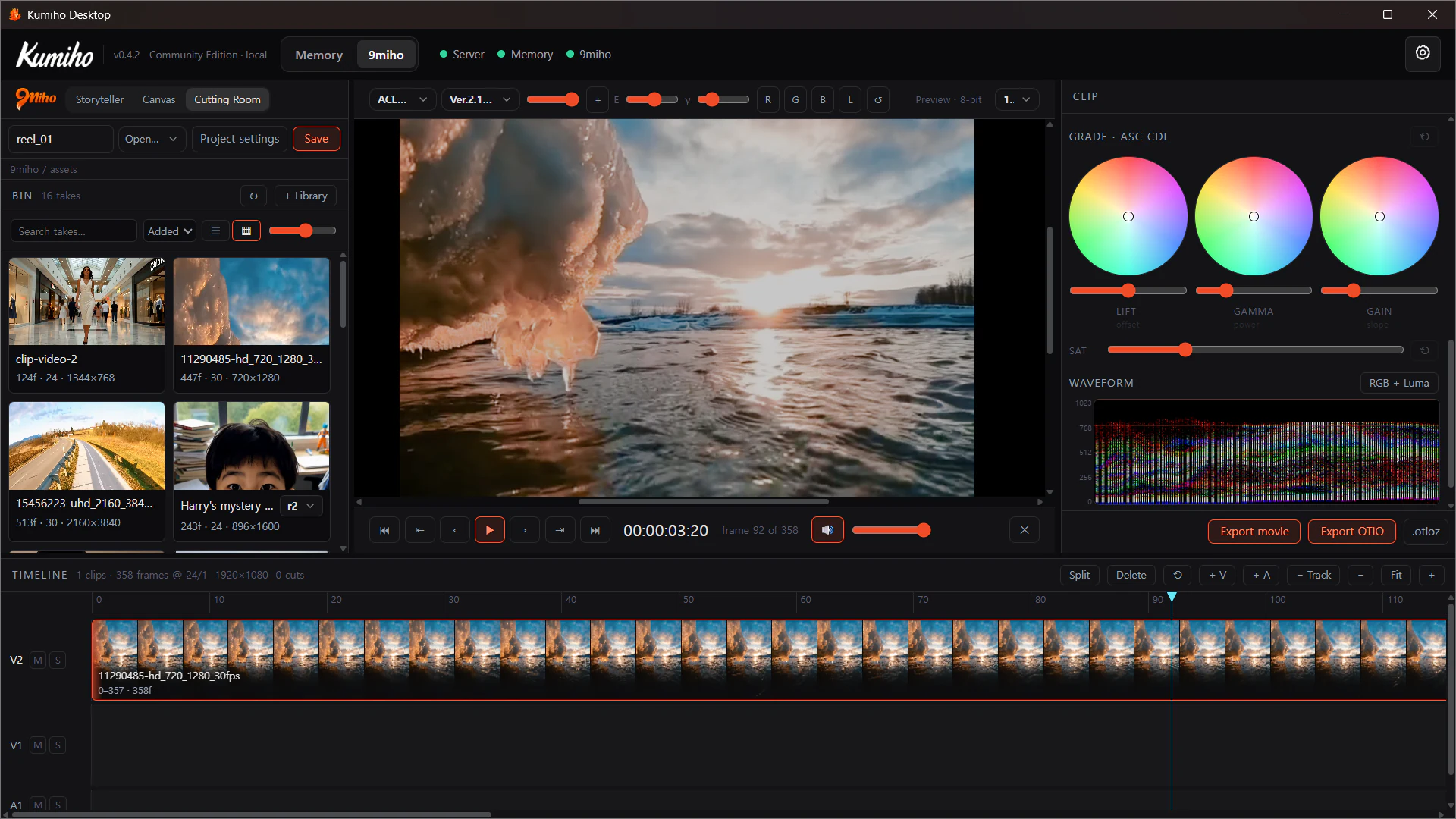
The Viewer is an 8-bit preview
The interface explicitly labels the monitor Preview · 8-bit. Browser decoding and display are not a 10-bit reference monitoring path.
Use the Viewer and scopes to inspect and make documented decisions, but confirm a high-bit-depth master in an appropriate downstream environment. Cutting Room’s colour tools are not an automated QC system: there is no current pass/fail workflow, issue queue, caption/subtitle track, Vision-QC report, or exported QC certificate.
Save is not Movie Export
Save registers the editable OTIO cut as a versioned Item with pinned source lineage. It preserves the document you can reopen and continue editing.
Movie export creates a flattened media file. It conforms the topmost picture to project rate/raster and renders the current monitored audio mix.
Available presets are gated by the encoders actually present:
- H.264 review;
- ProRes 422 HQ;
- DNxHR HQX.
Colour mode is either Bypass or a client-prepared Rec.709 LUT path. The server validates the LUT’s integrity and shape; this boundary should not be described as proof of a complete OCIO/ACES bake pipeline.
OTIO handoff package
Export OTIO preserves edit structure rather than flattening it. The package can include:
timeline.otio;- copied pinned source media;
manifest.jsonwith revision-aware source information;- optional
.otiozarchive; - per-Clip
.cdlfiles andgrades.cccwhen grades are present; - a CMX3600 EDL for the first video track.
OTIO remains the full multi-track picture-and-audio conform document. The EDL is a compatibility sidecar for the first video track, not a replacement for the full Timeline.
For qualifying 10-bit AVC sources, optional DNxHR HQX mezzanines can be prepared when ffmpeg and the required encoder are available. Original masters remain part of the handoff evidence.
Choose the right output
| Goal | Use |
|---|---|
| Continue editing this cut in 9Miho | Save |
| Send a small review file | H.264 Movie Export |
| Create a flattened high-quality intermediate | ProRes 422 HQ or DNxHR HQX Movie Export, when available |
| Preserve multi-track edit decisions and source pins for another editor | Export OTIO |
| Preserve per-Clip grade decisions with the conform | OTIO package with CDL/CCC sidecars |
Movie Export and OTIO answer different production needs. A successful flattened render does not replace revision-aware handoff evidence, and an OTIO package does not promise that every downstream application will interpret every extension identically.
Export safety limits
Movie Export enforces bounded project limits, including supported frame rates, even raster dimensions, an 8K-DCI-area ceiling, 64 tracks, 1,000 Timeline items, 24 hours, and 10,000,000 frames.
Encoder availability is checked rather than assumed. When a requested mezzanine or movie codec is unavailable, Cutting Room reports the missing capability instead of silently changing the output format.